الرواتب: Payroll / Salary Payout / Tax & Benefits
صفحة تدريبية عملية تُغطي إعدادات ومراحل مسير الرواتب من تعريف المكوّنات والهياكل، مرورًا بإنشاء القسائم والدفع، وحتى الضرائب والإعفاءات والمزايا. كل قسم يشرح الهدف وكيفية الاستخدام داخل نفس الفقرة (بدون عنوان فرعي منفصل).
1) نظرة عامة على دورة الرواتب
الغرض من موديول الرواتب هو احتساب وصرف أجور الموظفين بدقة وتتبّع آثارها المحاسبية والضريبية. تبدأ الدورة عادةً بـ تهيئة الماسترز (مكوّنات الراتب، هيكل الراتب، فترة الرواتب، شرائح ضريبة الدخل) ثم تعيين هيكل الراتب للموظفين، وبعدها إنشاء Payroll Entry الذي يُولد Salary Slips ويقوم بالترحيل المحاسبي والدفع. أي بدلات/حسميات إضافية تُسجل عبر Additional Salary أو Employee Incentive، بينما التزامات الحجز تُدار عبر Salary Withholding. الضرائب والإعفاءات تُدار من مساحة Tax & Benefits.
- تعريف Company / Branch / Department وربط الموظفين بها.
- اعتماد Chart of Accounts وحسابات الرواتب (مصروف الرواتب، مخصصات، مستحقات).
- تحديد العملة، والتقويم/فترة الصرف في Payroll Period.
2) الماسترز الأساسية (Masters)
2.1 Salary Component – مكوّنات الراتب
يُعرّف كل بند يؤثر على الراتب مثل: أساسي، بدل سكن، بدل نقل، حسم غياب… مع نوعه (Earning / Deduction) وصيغته والحساب المحاسبي. المقصود منه ضبط منطق الاحتساب والربط المحاسبي كي يُستخدم لاحقًا داخل Salary Structure.


- اذهب إلى Payroll → Salary Component ثم New.
- حدّد النوع (Earning/Deduction)، الحساب، والصيغة (مبلغ ثابت/نسبة/تعExpression).
- إن لزم، فعّل Do not include in total للبنود الإعلامية.
2.2 Salary Structure – هيكل الراتب
قالب يضم مجموعة مكوّنات وقواعدها لمجموعة موظفين (مثلاً “شهري – إداري”). يستخدم المكوّنات المعرّفة ويحدد طريقة إسنادها للموظف. الغاية منه توحيد السياسة وربطها بالموظفين لتوليد القسائم تلقائيًا.
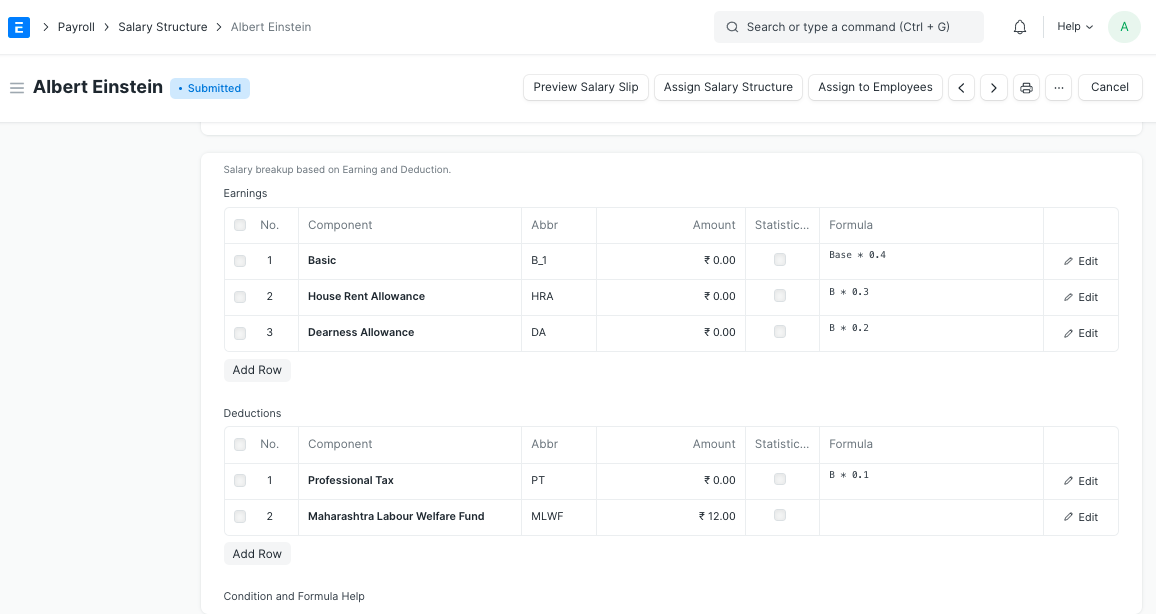
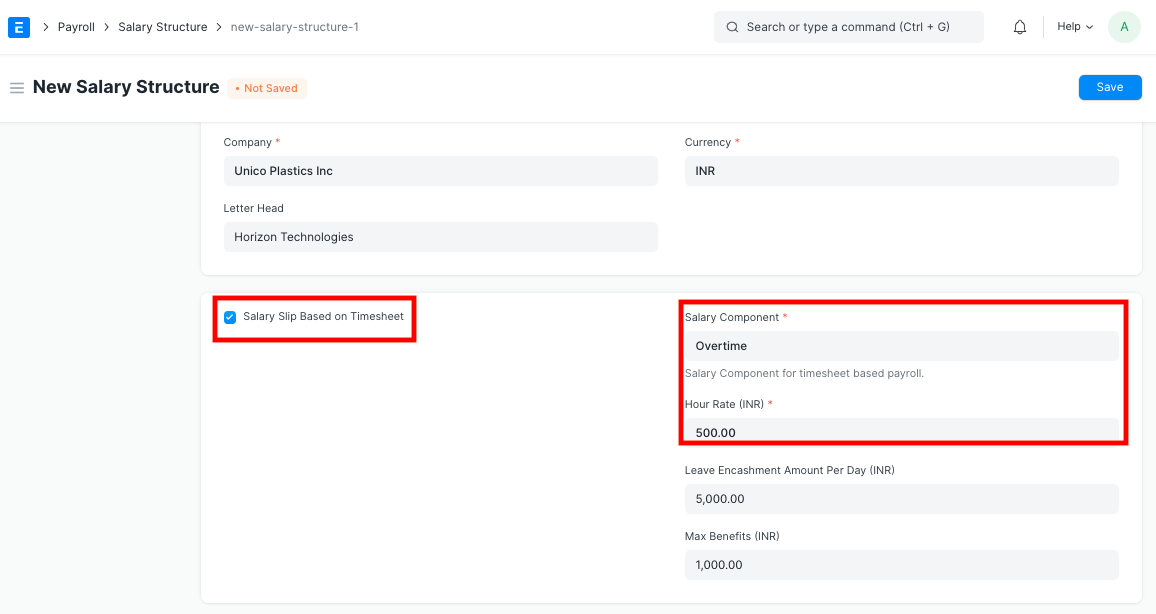
- Payroll → Salary Structure → New.
- اختر Pay Frequency (شهري/أسبوعي) وأضف المكوّنات مع القيم/الصيغ.
- احفظ ثم استخدمه في Salary Structure Assignment.
2.3 Salary Structure Assignment – تعيين هيكل الراتب
يربط الموظف بهيكل راتب معيّن ويحدد تاريخ النفاذ وقيمة البنود المتغيرة (إن وُجدت). القصد منه جعل النظام يعرف أي هيكل يُطبّق على الموظف عند إنشاء القسيمة.
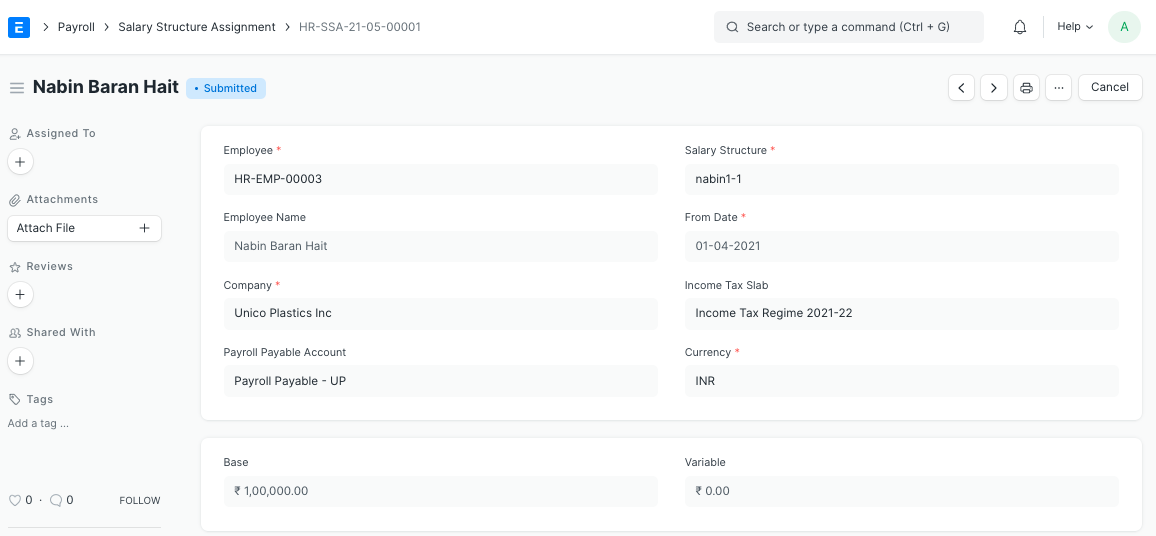
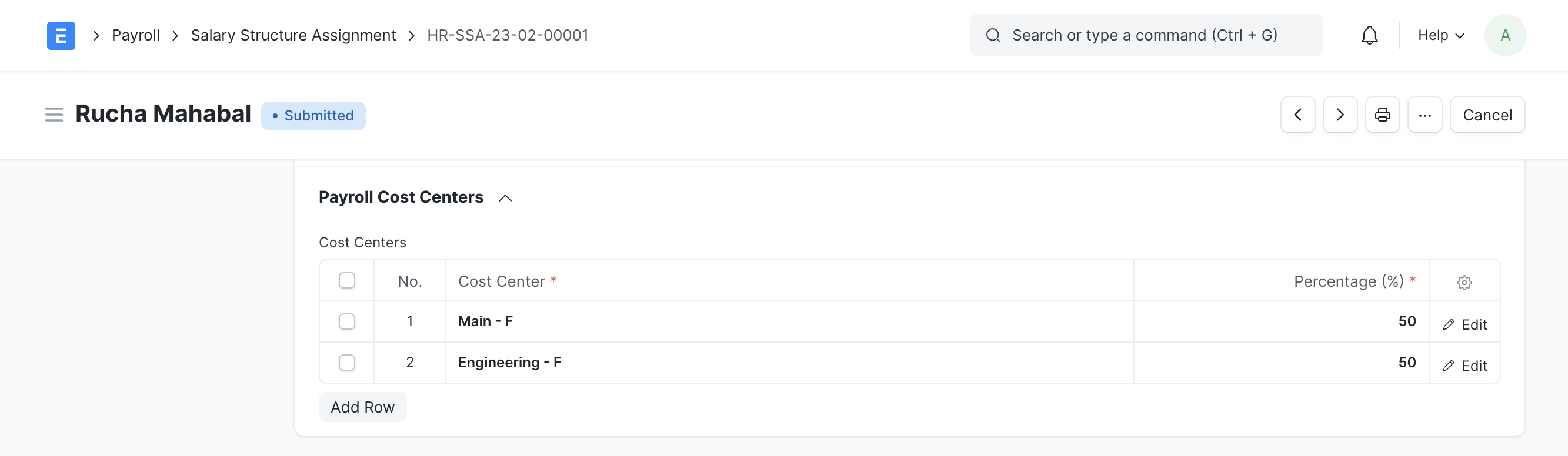
- Payroll → Salary Structure Assignment → New.
- اختر الموظف، الهيكل، تاريخ البدء، وعدّل البنود إن لزم.
- احفظ/اعتمد. (للتعيين الجماعي استخدم Bulk Salary Structure Assignment).
2.4 Payroll Period – فترة الرواتب
تحدد بداية ونهاية السنة/الفترة المرجعية التي تُنشأ داخلها إدخالات الرواتب والضرائب. الهدف هو توحيد نطاق الحسابات والتقارير وربطه بالتقويم الضريبي.
- Payroll → Payroll Period → New.
- حدد Company وStart/End Date وربط Holiday List إن لزم.
2.5 Income Tax Slab – شرائح ضريبة الدخل
تعريف الشرائح والنِسَب والحدود المعفاة، وتحديد ما إذا كان الاحتساب سنويًا أو شهريًا. يستخدم في Income Tax Computation وداخل القسائم عند تمكين احتساب الضريبة.
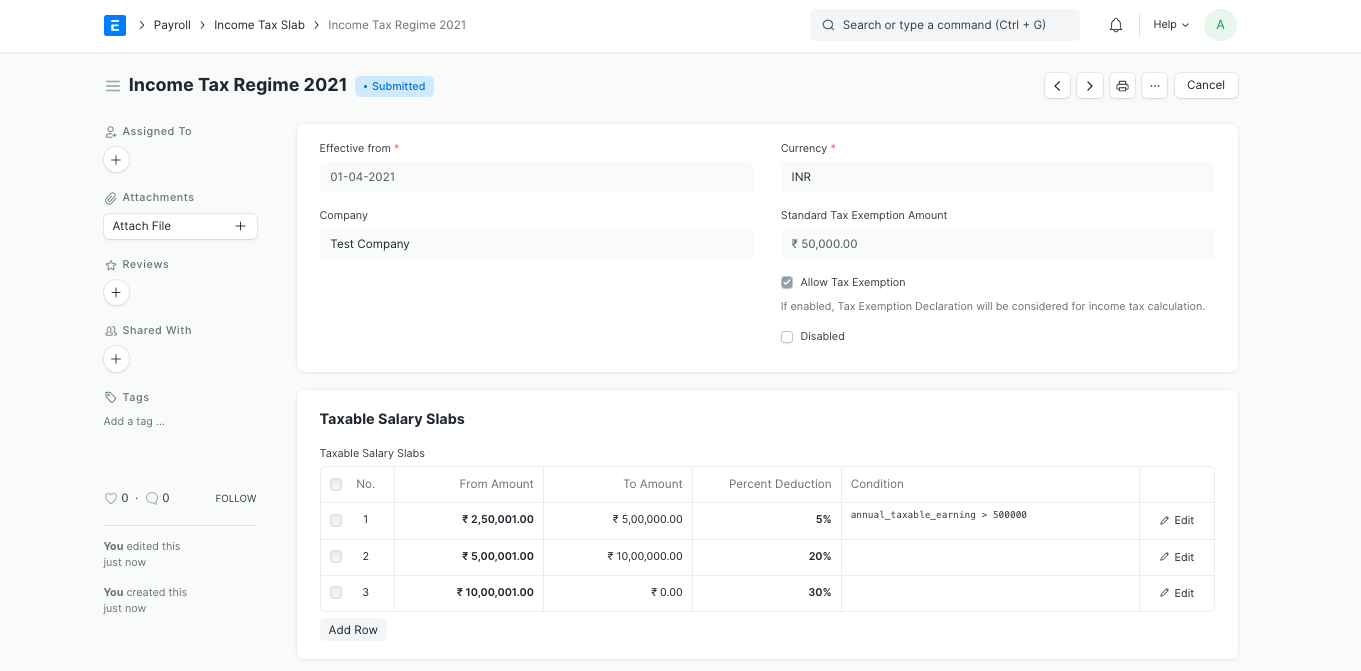

- Tax & Benefits → Income Tax Slab → New.
- أضف الشرائح (من–إلى) والنسبة والثابت/الإعفاء.
3) تشغيل الرواتب (Payroll Entry & Slips)
3.1 Additional Salary / Incentives / Withholding
سجّل أي بنود خارج الهيكل مثل مكافأة، خصم غرامة، أو حجز مستحقات. Additional Salary يضيف بندًا واحدًا لموظف معيّن وتاريخ محدد. Employee Incentive لإدارة حوافز قد تكون جماعية. Salary Withholding لحجز جزء من الراتب حتى تاريخ تحرير.
- أنشئ Additional Salary وحدد النوع (Earning/Deduction) والمبلغ والفترة.
- للحوافز الجماعية استخدم Employee Incentive.
- للإيقاف المؤقت: Salary Withholding مع سبب وتاريخ انتهاء.
3.2 Payroll Entry – إنشاء القسائم وترحيلها
هو المستند الجامع الذي يُنشئ Salary Slips للموظفين المحددين ضمن الشركة/الفرع/القسم وخلال فترة معينة، ثم يعتمدها ويولّد قيود GL، ويتابع الدفع. الهدف منه أتمتة الدُفعة كاملةً.
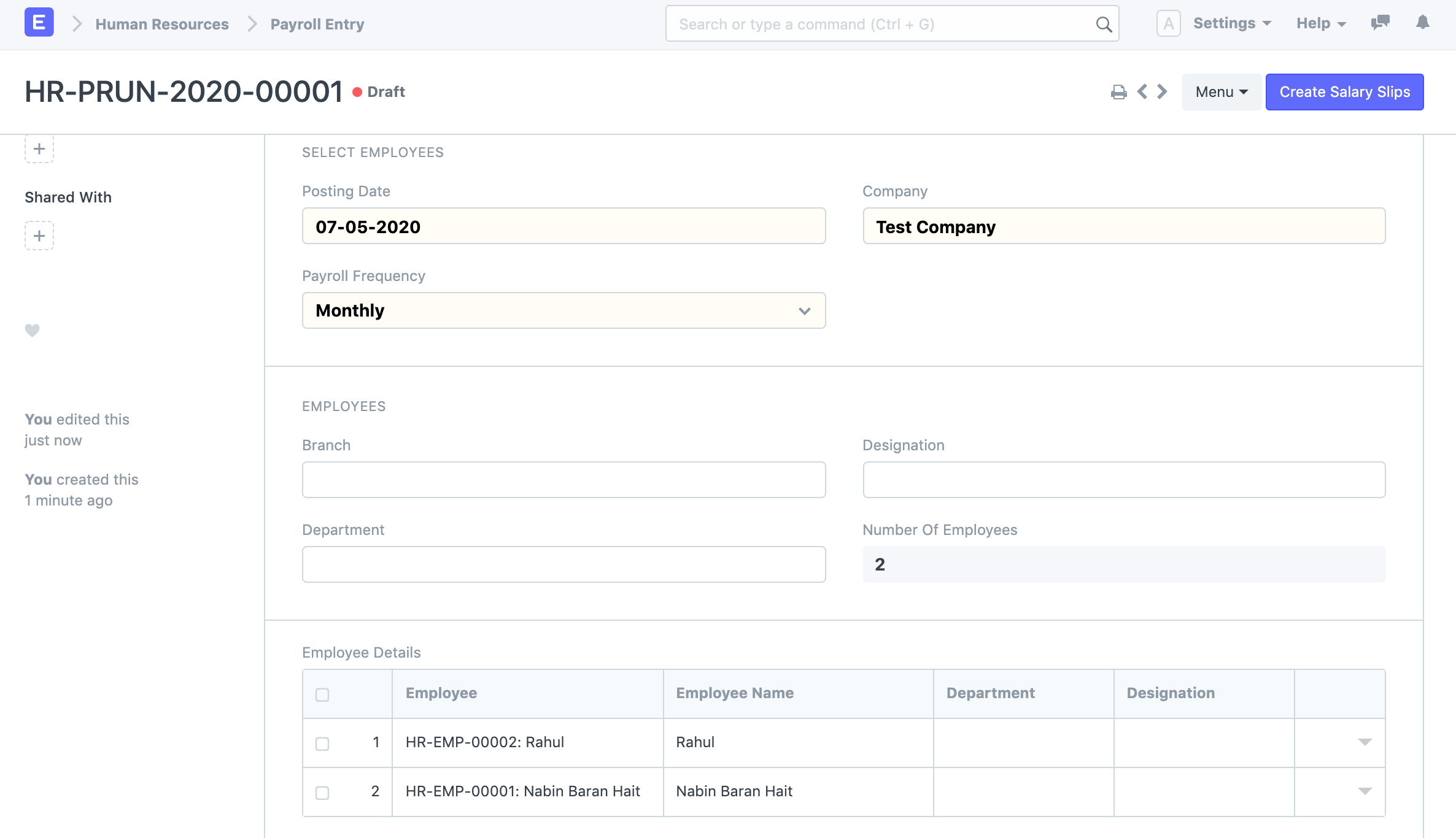
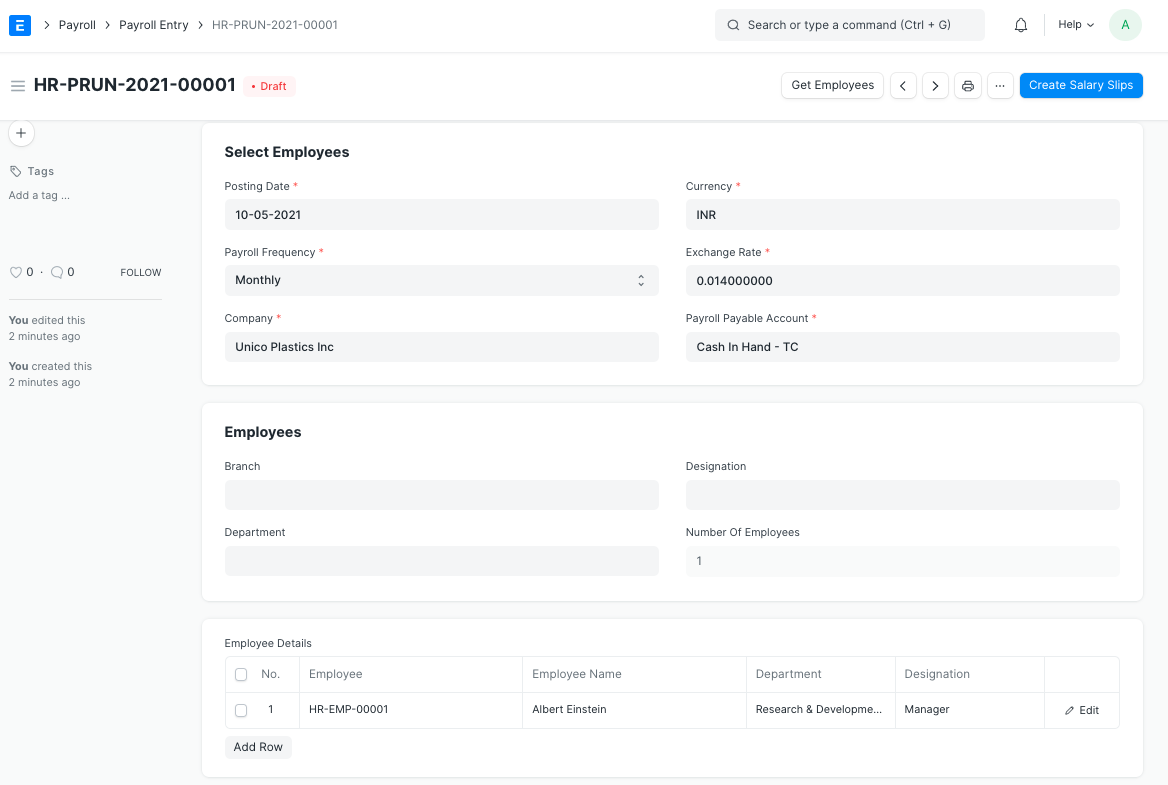
- Payroll → Payroll Entry → حدّد الشركة ونطاق التاريخ والفلاتر.
- اضغط Get Employees → راجع القائمة.
- Create Salary Slips → Submit Salary Slip (فردي/جماعي).
- Submit Payroll Entry لإنشاء قيود GL تلقائيًا.
- اختياري: Create Bank Entry / Payment Entries للدفع البنكي/النقدي.
3.3 Salary Slip – قسيمة الراتب
تمثل تفاصيل أجر الموظف لتلك الفترة. تُستمد المكوّنات من الهيكل والتعيين والبنود الإضافية والضرائب. تُعتمد ثم تُرحّل آليًا عبر Payroll Entry أو يدويًا.
- تحقق من الحضور/الإجازات إذا كان الهيكل يعتمدها في الحساب.
- راجع صافي الراتب والعملة والخصومات.
4) مساحة Salary Payout – تنفيذ الدفع والتقارير
مساحة العمل “Salary Payout” تجمع الروابط التشغيلية الشائعة: Salary Slip، Payroll Entry، Bulk Salary Structure Assignment، وتقارير الدفع مثل Salary Register وBank Remittance و Salary Payments Based On Payment Mode وSalary Payments via ECS. الهدف منها إنجاز دورة الصرف ومراجعة الدُفعات بسرعة.
4.1 تقارير الدفع الأساسية
- Salary Register: سجل مجمع لكل موظف/فترة مع المكوّنات والصافي.
- Bank Remittance: ملف/قائمة تحويلات البنك حسب الحساب/المود.
- Payments Based on Mode: تحليل حسب طريقة الدفع (تحويل، نقد، شيك).
- Payments via ECS: توليد/توثيق ملفات ECS إن كانت مدعومة بنكيًا.
5) الضرائب والمزايا – Tax & Benefits
هذه المساحة تُستخدم لضبط الضرائب وإدارة إعفاءات الموظفين ومنافعهم. الفكرة أن الموظف يقدّم Declarations وإثباتات Proof Submission، ويظهر أثرها في Income Tax Computation وتُخصم في القسيمة.
5.1 Tax Setup – الإعدادات الضريبية
- Income Tax Slab: تعريف الشرائح كما فُصّل أعلاه.
- Employee Tax Exemption Category / Sub Category: تصنيف أنواع الإعفاء (تعليم، تأمين، سكن…) بحدودها.
5.2 Exemptions – الإقرارات والإثباتات
- Employee Tax Exemption Declaration: يقرّ الموظف بالعناصر المتوقع المطالبة بها للسنة.
- Employee Tax Exemption Proof Submission: رفع المستندات الداعمة للتحقق قبل التسوية.
5.3 Benefits – المزايا
- Employee Benefit Application: تقديم طلب ميزة (تأمين صحي، بدل معدات…).
- Employee Benefit Claim: تسديد المطالبات المرتبطة بالميزة المعتمدة.
5.4 Tax Reports – التقارير الضريبية
- Income Tax Computation: احتساب الضريبة لكل موظف حسب الشرائح والإعفاءات.
- Income Tax Deductions: ملخص الاستقطاعات المخصومة فعلًا عبر القسائم.
6) التكامل المحاسبي (الحسابات والقيود)
عند اعتماد Payroll Entry، ينشئ النظام قيود GL تلقائيًا: مدينة على حسابات المصروفات، ودائنة على حسابات الالتزامات (مستحقات رواتب/ضرائب)، ثم تُسدد عبر Payment Entry أو Bank Entry. تأكد من إعداد Accounts Settings وربط كل مكوّن بالحساب الصحيح.
- مصروف الرواتب (P&L) – للبدلات الإيجابية.
- مخصصات/التزامات الرواتب (B/S) – لصافي المستحق والضرائب.
- حسابات مزايا أو حجز الرواتب حسب السياسة.
7) استكشاف الأخطاء الشائعة
- صافي راتب غير متوقع: تحقق من Additional Salary وWithholding وغياب/إجازات.
- فشل إنشاء القسائم: تأكد من وجود Salary Structure Assignment ساري المفعول خلال الفترة.
- فروقات GL: راجع حسابات المكوّنات، وعملة الشركة، وتواريخ الاعتماد.
- ضرائب صفرية: افحص Income Tax Slab وPayroll Period وربط الموظف بالإعفاءات.
8) خطة جلسة تدريبية مقترحة
- بناء Salary Components وSalary Structure لسيناريو تجريبي.
- تعيين الهيكل عبر SSA لمجموعة موظفين (واحد ثابت + واحد متغير).
- إنشاء Additional Salary (مكافأة/حسم) وWithholding لموظف.
- تشغيل Payroll Entry كامل: إنشاء القسائم → اعتماد → ترحيل GL → دفع.
- استعراض التقارير: Salary Register / Bank Remittance / Income Tax Computation.
Payroll: Payroll / Salary Payout / Tax & Benefits
A hands-on training page that covers payroll configuration and processing steps: from defining components and structures, through creating salary slips and payments, all the way to taxes, exemptions, and employee benefits. Each section explains the purpose and how to use it inside ERPNext in the same paragraph.
1) Overview of the Payroll Cycle
The purpose of the Payroll module is to calculate and pay employees’ wages accurately and track all accounting and tax implications. The cycle usually starts with master data setup (salary components, salary structures, payroll periods, income tax slabs), then assigning salary structures to employees, and afterwards creating the Payroll Entry that generates Salary Slips, posts GL entries, and handles payment. Any additional allowances/deductions are recorded using Additional Salary or Employee Incentive, while withheld amounts are managed throughout Salary Withholding. Taxes and exemptions are configured from the Tax & Benefits workspace.
- Define Company / Branch / Department and link employees to them.
- Finalize the Chart of Accounts and payroll-related accounts (salary expense, provisions, payables).
- Set the currency and the payroll calendar in Payroll Period.
2) Core Masters
2.1 Salary Component
Defines each element that affects the salary such as: Basic, Housing Allowance, Transport Allowance, Absence Deduction, etc. Each component has a type (Earning / Deduction), formula, and linked account. The idea is to control calculation logic and account mapping so that the component can be reused inside the Salary Structure.
- Go to Payroll → Salary Component and click New.
- Set the type (Earning/Deduction), account, and calculation method (fixed amount, percentage, expression).
- If needed, enable Do not include in total for informational components.
2.2 Salary Structure
A template grouping multiple components and rules for a group of employees (for example, “Monthly – Admin”). It uses the previously defined components and specifies how they apply to an employee. The purpose is to standardize the policy and link it to employees so salary slips can be created automatically.
- Payroll → Salary Structure → New.
- Select Pay Frequency (Monthly/Weekly) and add components with values/formulas.
- Save the structure and use it in Salary Structure Assignment.
2.3 Salary Structure Assignment
Links an employee to a specific Salary Structure and sets the effective date and any variable component values. This tells the system which structure to apply when generating salary slips for that employee.
- Payroll → Salary Structure Assignment → New.
- Select the employee, structure, start date, and adjust component values if needed.
- Save/Submit. (For mass assignment, use Bulk Salary Structure Assignment.)
2.4 Payroll Period
Defines the start and end of the fiscal/payroll period in which payroll entries and tax computations are created. The purpose is to unify reporting ranges and align them with the tax calendar.
- Payroll → Payroll Period → New.
- Select Company, Start/End Date, and link a Holiday List if required.
2.5 Income Tax Slab
Defines tax slabs, rates, and exempt thresholds, and whether the calculation is yearly or monthly. It is used in Income Tax Computation and inside salary slips when tax calculation is enabled.
- Tax & Benefits → Income Tax Slab → New.
- Add the slabs (From–To), rate, and fixed/exempt amounts.
3) Running Payroll (Payroll Entry & Slips)
3.1 Additional Salary / Incentives / Withholding
Use these documents to record any items outside the base structure such as bonuses, penalties, or withheld amounts. Additional Salary adds a single earning/deduction for a specific employee and period. Employee Incentive manages incentive schemes which can be applied to multiple employees. Salary Withholding is used to temporarily withhold part of the net salary until a release date.
- Create an Additional Salary and specify type (Earning/Deduction), amount, and period.
- For group incentives, use Employee Incentive.
- For temporary holds, create Salary Withholding with reason and end date.
3.2 Payroll Entry – Generate & Post
The central document that creates Salary Slips for all selected employees within a company/branch/department for a specific period, then submits them, posts GL entries, and coordinates payment. The goal is to automate the entire payroll run.
- Payroll → Payroll Entry → set company, date range, and filters.
- Click Get Employees and review the list.
- Run Create Salary Slips then Submit Salary Slip (individually or in bulk).
- Submit Payroll Entry to auto-create GL entries.
- Optionally: Create Bank Entry / Payment Entries for bank/cash payments.
3.3 Salary Slip
Represents the detailed pay for one employee and one pay period. Components are pulled from the structure, assignments, additional salary documents, and tax configuration. The slip is submitted and posted automatically through the Payroll Entry or manually, if needed.
- Verify attendance/leaves if the structure uses them in calculations.
- Review net pay, currency, and all deductions before submission.
4) Salary Payout Workspace – Execution & Reports
The “Salary Payout” workspace groups the most frequently used links: Salary Slip, Payroll Entry, Bulk Salary Structure Assignment, and payment-related reports such as Salary Register, Bank Remittance, Salary Payments Based On Payment Mode, and Salary Payments via ECS. The aim is to complete and review salary payments quickly from one place.
4.1 Core Payout Reports
- Salary Register: Consolidated register per employee/period with all components and net pay.
- Bank Remittance: File/list for bank transfers grouped by account or payment mode.
- Payments Based on Mode: Analysis by payment method (transfer, cash, cheque, etc.).
- Payments via ECS: Generate or track ECS files where supported by the bank.
5) Taxes and Benefits – Tax & Benefits
This workspace is used to configure tax rules and manage employee exemptions and benefits. The idea is that employees submit Declarations and upload Proof Submissions, and their effect appears in the Income Tax Computation and is reflected in the salary slip.
5.1 Tax Setup
- Income Tax Slab: Define tax slabs as described earlier.
- Employee Tax Exemption Category / Sub Category: Classify exemption types (education, insurance, housing, etc.) with their limits.
5.2 Exemptions – Declarations and Proof
- Employee Tax Exemption Declaration: Employee declares the items they plan to claim during the year.
- Employee Tax Exemption Proof Submission: Employee uploads supporting documents for verification prior to finalization.
5.3 Benefits
- Employee Benefit Application: Employee applies for a benefit (medical insurance, equipment allowance, etc.).
- Employee Benefit Claim: Settlement of claims linked to an approved benefit.
5.4 Tax Reports
- Income Tax Computation: Calculates tax per employee according to slabs and exemptions.
- Income Tax Deductions: Summary of the actual tax amounts deducted through salary slips.
6) Accounting Integration (Accounts & Entries)
When a Payroll Entry is submitted, ERPNext automatically generates the required GL Entries: debits to expense accounts and credits to liability accounts (salary payable, tax payable, etc.). These liabilities are then settled through Payment Entry or Bank Entry. Make sure the Accounts Settings and each component’s accounts are configured correctly.
- Salary Expense (P&L) – for positive earnings and allowances.
- Salary/Tax Payable (B/S) – for net salary and statutory deductions.
- Benefit or Withholding accounts – according to your company policy.
7) Common Troubleshooting Scenarios
- Unexpected net pay: Check Additional Salary, Withholding, and attendance/leaves.
- Failed slip creation: Ensure there is an active Salary Structure Assignment covering the selected period.
- GL mismatches: Review component accounts, company currency, and posting dates.
- Zero tax: Verify Income Tax Slab, Payroll Period, and employee exemption configuration.
8) Suggested Training Session Plan
- Build Salary Components and a Salary Structure for a demo scenario.
- Assign the structure via SSA to a group of employees (one with fixed components, one with variable components).
- Create Additional Salary (bonus/deduction) and Withholding for a sample employee.
- Run a full Payroll Entry: create slips → submit → post GL → process payment.
- Review reports: Salary Register / Bank Remittance / Income Tax Computation.